Best Hardware Wallets 2026: Secure Picks for Crypto Storage
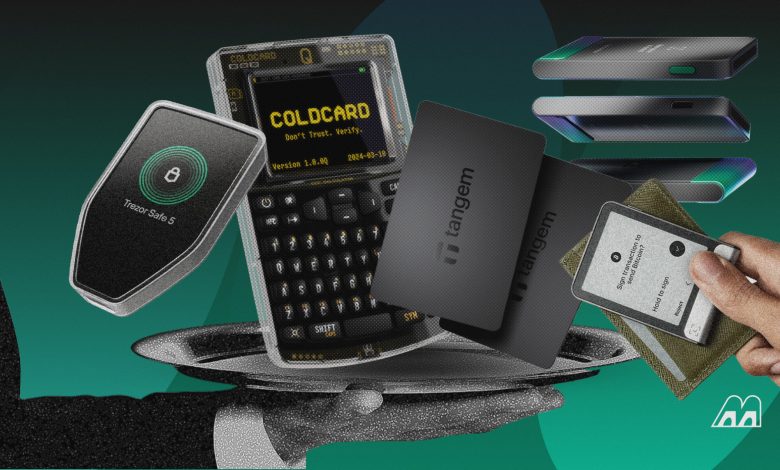
Demand for offline crypto storage keeps growing, with the hardware wallet market valued at $720 million in 2026 and projected to reach $2.25 billion by 2031. We tested 10 cold wallets, from seedless NFC cards to Bitcoin-only signers, and tracked every 2026 security disclosure that affects them.
Best Hardware Wallets: Quick Picks
- Best for beginners: Tangem Wallet
- Best for open-source security: Trezor Safe 7
- Best for multi-chain users: Ledger Flex
- Best air-gapped hardware wallet: Keystone 3 Pro
- Best budget air-gapped wallet: SafePal S1 Pro
- Best touchscreen air-gapped wallet: ELLIPAL Titan 2.0
- Best for simple self-custody: BitBox02 Nova
- Best for backup and recovery: Cypherock X1
- Best premium security-focused wallet: NGRAVE ZERO
- Best hardware wallet for Bitcoin: COLDCARD Q
Best Hardware Wallets: Quick Comparison
| Wallet | Best For | Price | Security | Connectivity | Coin Support |
| Tangem Wallet | Beginners | $59.90 (2 cards) | EAL6+ chip, seedless backup | NFC | 14,100+ assets |
| Trezor Safe 7 | Open-source security | $249 | TROPIC01 + EAL6+ chip | Bluetooth, USB-C | Thousands |
| Ledger Flex | Multi-chain users | $249 | EAL6+ secure element | USB-C, Bluetooth, NFC | 500+ in-app, thousands via third-party wallets |
| Keystone 3 Pro | Air-gapped storage | $149 | 3 secure elements | QR, microSD | 5,500+ assets |
| SafePal S1 Pro | Budget air-gapped | $89.99 | EAL6+ secure element | QR | 200+ blockchains |
| ELLIPAL Titan 2.0 | Touchscreen air-gapped | $149 | EAL5+ secure element | QR | 10,000+ tokens |
| BitBox02 Nova | Simple self-custody | $201 | EAL6+ chip, open-source firmware | USB-C, optional Bluetooth | 1,500+ tokens (Multi) |
| Cypherock X1 | Backup and recovery | $99 (discounted) | EAL6+ cards, 2-of-5 key split | USB-C, NFC | 19,000+ assets |
| NGRAVE ZERO | Premium security | $398 | EAL7-certified OS | QR | 15 native coins + ERC-20 |
| COLDCARD Q | Bitcoin | $289 | Dual secure elements | QR, microSD, NFC, USB-C | Bitcoin only |
The 10 Best Hardware Wallets in 2026
1. Tangem Wallet

- Best for: Beginners
- Price: $59.90 (2-card set); $69.90 (3-card set).
- Type: NFC smart-card hardware wallet
- Connectivity: NFC only (no USB, no Bluetooth)
- Air-gapped: Depends on definition. The card has no internet connection, battery, or cable port, but it signs transactions over a short-range radio rather than QR codes or microSD cards.
Tangem replaces the usual USB device with credit-card-sized cards that talk to your smartphone over NFC (near field communication). This is the same short-range technology behind contactless payments. Every card in the set holds the same wallet, so your spare cards act as the backup instead of a written recovery phrase.
What stands out
- Seedless by default
- Nothing to charge or wear out, since the card has no battery, screen, or port.
- Lowest entry price on our list, making it a practical first step if you’re exploring crypto wallets for the first time, a move we cover in our guide to crypto wallets for beginners.
Security
Your private keys stay offline inside a Samsung secure element chip certified to EAL6+ (Evaluation Assurance Level). The more everyday limitation is the lack of a screen. You review transaction details on your phone, so a compromised phone could show you one address while the card signs a transaction to another.
Bottom line
Tangem is the simplest route into self-custody for anyone who doesn’t want the burden of keeping their seed phrases safe.
2. Trezor Safe 7

- Best for: Open-source security
- Price: $249
- Type: Touchscreen hardware wallet
- Connectivity: Bluetooth and USB-C
- Air-gapped: No
The Trezor Safe 7 sits above the Safe 5 and Safe 3 in a lineup that has fully replaced the older Trezor Model T. It’s Trezor’s first wireless model, with a 2.5-inch color touchscreen, an aluminum body rated IP54 for dust and splashes, and Qi2 wireless charging.
What stands out
- Three chips from three vendors. The TROPIC01 secure element works alongside an EAL6+ certified Optiga chip and an STM32U5 microcontroller. So a flaw in one chip will not hand over your wallet to malicious actors.
- Works with iPhone. Bluetooth lets you sign from an iPhone, which older Trezors couldn’t do.
- Post-quantum protection for the device itself. Trezor uses post-quantum signatures to check the firmware every time the Safe 7 starts, protecting the device from tampered updates.
Security
Your private keys stay offline, and every transaction detail appears on the device screen before you approve it. Ten wrong PIN attempts wipe the device, so your recovery phrase is your only way back in.
Bottom line
The Safe 7 suits advanced users who want to check the firmware themselves and sign from a phone. If you don’t need Bluetooth, the cheaper Safe 5 or Safe 3 gives you the same Trezor Suite experience over a cable.
3. Ledger Flex

- Best for: Multi-chain users
- Price: $249
- Type: E Ink touchscreen hardware wallet
- Connectivity: USB-C, Bluetooth, and NFC
- Air-gapped: No
The Ledger Flex sits between the Nano range and the $399 Stax in the lineup. Its 2.84-inch E Ink touchscreen shows a full wallet address without scrolling, fixing the biggest frustration with the older Ledger Nano’s tiny display.
What stands out
- Wide asset coverage. Ledger Wallet supports 500+ assets directly, and pairing the Flex with third-party wallets such as MetaMask adds thousands more.
- Backup included. Ledger now ships a Recovery Key card that restores access with a tap, alongside your 24-word recovery phrase.
Security
Your private keys stay inside a CC EAL6+ secure element, and three wrong PIN entries reset the device. However, unlike Trezor’s firmware, Ledger’s operating system is closed source, so you can’t independently verify the code.
Bottom line
The Flex is the most comfortable way to manage many chains from one physical device. If open-source code matters more to you than app breadth, the Trezor Safe 7 costs the same.
4. Keystone 3 Pro

- Best for: Air-gapped hardware wallet
- Price: $149
- Type: Air-gapped touchscreen hardware wallet
- Connectivity: QR codes and microSD (USB for optional firmware updates)
- Air-gapped: Yes, for signing
The Keystone 3 Pro never needs a cable or Bluetooth to sign a transaction. Your phone or laptop builds the transaction and shows it as a QR code. The Keystone scans it with its camera, signs it offline, and displays a signed QR code for your software wallet to broadcast.
What stands out
- Three secure element chips store your seed phrase and fingerprint data separately from the main processor.
- Up to three separate wallets on one device. You can keep savings on one seed phrase and daily spending on another.
- Readable smart contract details before you sign, which reduces blind signing.
- Shamir backup and dice entropy for advanced users who want more control over how the recovery phrase is created and split.
Security
With no wireless radio and no data link during signing, the Keystone has a smaller attack surface than connected wallets. It also wipes its internal data if someone opens the case. Additionally, Keystone has open-sourced its secure element firmware, hardware design, and application layer, along with parts of its operating system.
Bottom line
The Keystone 3 Pro is the most practical air-gapped option if you hold assets across many chains and use DeFi apps. If you sign dozens of transactions a day, the QR round trip may feel slow.
5. SafePal S1 Pro

- Best for: Budget air-gapped wallet
- Price: $89.99
- Type: Air-gapped hardware wallet
- Connectivity: QR codes (USB-C for charging)
- Air-gapped: Yes, for signing
The SafePal S1 Pro gives you QR-based cold storage at a little over half the price of the Keystone 3 Pro. It has no Bluetooth, Wi-Fi, or NFC. You build a transaction in the SafePal app on your smartphone; the device scans the QR code with its camera, signs it offline, and shows a signed code for the app to broadcast.
What stands out
- Premium build for the price. The S1 Pro uses an aluminum alloy body and tempered glass, while the $49.99 S1 has a plastic body with the same air-gapped design.
- Long battery life. SafePal rates the 500mAh battery for up to 25 days with 15 minutes of daily use.
- Broad chain support. SafePal lists 200+ blockchains, with swaps, staking, and dApp access built into its app.
Security
Your private keys sit inside a CC EAL6+ secure element, and a self-destruct mechanism erases data if someone tampers with the device. Passphrase support adds a hidden wallet on top of your recovery phrase.
Bottom line
The S1 Pro is the cheapest option on this list for keeping keys fully offline during signing. Advanced users who want verifiable code might want to pay more for the Keystone.
6. ELLIPAL Titan 2.0

- Best for: Touchscreen air-gapped wallet
- Price: $149
- Type: Air-gapped touchscreen hardware wallet
- Connectivity: QR codes (microSD for firmware updates)
- Air-gapped: Yes
The ELLIPAL Titan 2.0 is built like a small phone, with a sealed metal body and a 4-inch touchscreen. It has no USB data port, Bluetooth, Wi-Fi, or NFC. You create transactions in the ELLIPAL app on your mobile device and pass them to the Titan by QR code.
What stands out
- Physical tamper defense. An anti-disassembly circuit wipes the keys if someone opens the case. Ten wrong password attempts trigger the same wipe.
- Up to 10 accounts on one device, with support for hidden secondary wallets.
- App features built in. Swaps, staking, and dApp access over WalletConnect all run through the ELLIPAL app, while your keys stay on the device.
Security
The Titan 2.0 stores private keys in a CC EAL5+ secure element, a certification level used in banking chips. Because it never connects to a computer or radio, it has no remote attack surface, and there’s no known exploit of Titan hardware to date.
Bottom line
The Titan 2.0 suits long-term holders who rarely move funds and want the toughest physical design. If you need desktop software or verifiable code, pick the Keystone.
7. BitBox02 Nova

- Best for: Simple self-custody
- Price: $201
- Type: Compact touch-slider hardware wallet
- Connectivity: USB-C and optional Bluetooth
- Air-gapped: No
The BitBox02 Nova is small enough to plug straight into a laptop or phone and has no buttons. You navigate by tapping and sliding along its edges. The Nova adds iPhone and iPad support, a tempered glass display, and a new EAL6+ certified secure chip.
You can set it up through the BitBoxApp. After pairing, confirm that the code on the phone matches the code on the device, then set a device password, and save the wallet backup to the included microSD card.
What stands out
- MicroSD backup: You can back up in seconds, and you can still display the 24 recovery words to write on paper or steel.
- Two editions: The Bitcoin-only edition removes all altcoin code to shrink the attack surface. The Multi edition adds Ethereum, Cardano, Litecoin, and 1,500+ tokens, but not Solana.
- Controlled Bluetooth: The optional Whisper connection runs on a separate chip that has no access to your wallet secrets, and you can switch Bluetooth off entirely.
Security
The Nova pairs an Optiga Trust M secure chip with a main processor running fully open-source firmware. This dual-chip design gives you both physical protection and open-source transparency. The trade-off is the small OLED screen, which makes checking long addresses slower than on the touchscreen wallets above.
Bottom line
The Nova suits Bitcoin holders and minimalists who want verifiable code in the simplest package. If you hold Solana, other altcoins, or meme coins, the Ledger Flex covers more ground.
8. Cypherock X1

- Best for: Backup and recovery
- Price: $99 (discounted)
- Type: Seedless hardware wallet with smart cards
- Connectivity: USB-C (Vault to computer) and NFC (cards to Vault)
- Air-gapped: No
The Cypherock X1 removes the single seed phrase that most hardware wallets depend on. When you create a wallet, it splits your private key into five encrypted pieces using Shamir’s Secret Sharing, a method that breaks a secret into parts so that no single part reveals it. One piece stays on the X1 Vault, and the other four go onto NFC smart cards. Any two pieces can restore the wallet, so losing one or two items doesn’t lock you out.
What stands out
- No single point of failure, so if the Vault breaks, you can buy a new device and recover with two of the four cards.
- Up to four wallets on one Vault, including seed phrases you import from other BIP39 wallets.
- Inheritance planning: Cypherock offers inheritance and PIN recovery options for families that need a clear handover plan.
Security
Each X1 Card holds its share inside an EAL6+ secure element, and the Vault never stores your complete private key. Cypherock says Keylabs has audited its security, and WalletScrutiny has reviewed the Vault firmware. The trade-off is partial transparency: the Vault code is open source, but the card code isn’t.
Bottom line
The X1 suits long-term holders and families who worry more about losing a backup than about hackers. It takes more planning than a standard wallet, and misplacing three cards along with the Vault means losing your funds.
9. NGRAVE ZERO

- Best for: Premium security-focused wallet
- Price: $398
- Type: Air-gapped touchscreen hardware wallet with fingerprint sensor
- Connectivity: QR codes only
- Air-gapped: Yes
The NGRAVE ZERO is the most isolated wallet on this list. It has no USB data connection, Bluetooth, NFC, Wi-Fi, or 4G. Data moves only through QR codes between the device and the NGRAVE LIQUID app on your phone.
During setup, the ZERO uses your fingerprint as one input to generate your private key, which NGRAVE calls the Perfect Key. You can view it as a standard 24-word recovery phrase at any time.
What stands out
- EAL7-certified operating system. NGRAVE built its own OS, and it’s the only wallet OS on this list certified at the highest Common Criteria level.
- Internal sensors wipe the device if someone opens it after setup.
- The August 2026 firmware update replaced NGRAVE’s older QR format with the open Universal QR standard, opening the ZERO to more third-party wallets.
Security
The ZERO combines a sealed air gap with biometric sign-in and tamper sensors, which makes remote attacks and quiet physical tampering very difficult. The trade-offs are trust and coverage. Its firmware is closed source, and it supports only 15 coins natively, though MetaMask and Rabby add ERC-20 tokens and 112+ EVM chains.
Bottom line
The ZERO is best for high-value holders who want maximum isolation and don’t mind paying for it. For verifiable code at less than half the price, choose the Keystone 3 Pro.
10. COLDCARD Q

- Best for: Bitcoin
- Price: $289
- Type: Bitcoin-only hardware wallet with keyboard
- Connectivity: QR codes, microSD, NFC, and USB-C
- Air-gapped: Yes, optional (runs on AAA batteries)
The COLDCARD Q is a Bitcoin-only signing device, built for users who don’t want to plug their wallet into a computer. It has a full QWERTY keyboard, a 3.2-inch screen, a QR scanner, and two microSD slots, and it can run on three AAA batteries. You pair it with third-party wallets such as Sparrow or Electrum, since COLDCARD has no companion app.
What stands out
- Two secure elements from different vendors, so a single compromised chip isn’t enough to reach your keys.
- Keyboard for long passphrases, which are painful to enter on button-based wallets.
- Permanent kill switches: You can cut a circuit trace to disable USB data or NFC at the hardware level.
Security
The Q’s design is among the strongest for Bitcoin transactions, but its July 2026 incident shows why the design alone isn’t enough. A firmware bug meant seeds created before version 1.5.0Q had weakened randomness. Coinkite says seeds that included at least 50 private dice rolls aren’t at risk from this issue. Anyone else should create a new seed on fixed firmware and move their funds.
Bottom line
The Q is the most flexible air-gapped signer for experienced Bitcoin holders, as long as you run current firmware and add your own entropy. Beginners and anyone holding altcoins should look elsewhere.
How We Chose the Best Hardware Wallets
We scored each wallet on six factors that decide whether your private keys stay safe and recoverable for years.
Security Architecture
A secure element is a tamper-resistant chip that stores your keys, and its certification level shows how well it resists lab attacks. Ratings on this list range from EAL5+ on the ELLIPAL Titan 2.0 to the EAL7-certified operating system on the NGRAVE ZERO. We also checked for tamper sensors and how each device signs: over a cable, a radio, or QR codes.
Firmware Transparency
Open-source firmware lets outside researchers inspect the code that handles your keys, so Trezor, BitBox, and Keystone scored higher here.
Backup and Recovery
We restored each wallet from its backup, including Tangem’s spare cards and Cypherock’s two-of-five card split, to confirm recovery works.
Ease of Use
You approve transactions by reading them, so screen size matters. A full address fits comfortably on the Ledger Flex’s 2.84-inch E Ink display but takes scrolling on the SafePal S1 Pro’s 1.3-inch screen.
Asset Support
Brands count supported assets differently. We separated native coin support from coverage added through third-party wallets like MetaMask.
Price and Value
Prices run from $59.90 to $398, so we asked whether each extra dollar buys more protection, coin support, or just a nicer build.
How to Choose the Best Hardware Wallet
The right hardware wallet depends on the assets you hold and how often you move it. Work through these six checks in order.
1. Start with security, not coin count
A long token list doesn’t mean much if the device can’t show you what you’re signing. Look for a certified secure element and a screen that displays the full destination address. Blind signing, which means approving a transaction you can’t read, is one of the most common ways people lose their money.
2. Choose the right recovery method
A recovery phrase works with almost any wallet, but anyone who finds it can take your funds. If writing down 24 words worries you, Tangem’s spare cards or Cypherock’s split backup remove that single point of failure.
3. Decide whether you need an air-gapped wallet
Air-gapped wallets like the Keystone 3 Pro sign through QR codes, so no cable or radio ever links to your computer. That removes a whole class of remote attacks, but every transaction takes two scans. If you move funds daily, a USB or Bluetooth wallet are usually faster.
4. Check which cryptocurrencies you own
List your coins and their networks before you buy. The COLDCARD Q is Bitcoin-only, the NGRAVE ZERO supports 15 coins natively, and the BitBox02 Nova’s Multi edition doesn’t support Solana.
5. Consider mobile and desktop compatibility
The Trezor Safe 7 and BitBox02 Nova both rely on Bluetooth for iPhone signing. Tangem and the ELLIPAL Titan 2.0 go the other way, with no desktop app.
6. Buy only from trusted sources
Order from the manufacturer or an official reseller, and check that the packaging hasn’t been opened. Never use a device that arrives with a recovery sheet already filled in. If you haven’t bought your first coins yet, our beginner’s guide to buying your first crypto is a good place to start.
Hardware Wallet vs. Cold Wallet: What’s the Difference?
A cold wallet is any setup that keeps your private keys offline. A hardware wallet is the most common type of cold wallet, but not every cold wallet is a hardware device, and not every hardware wallet avoids connections entirely. Cold storage also covers paper backups and DIY signers such as SeedSigner.
Are Hardware Wallets Really Safe?
Hardware wallets are the safest self-custody option, but they aren’t hack-proof. Remote attacks on the devices themselves are rare. Most losses come from phishing and exposed recovery phrases, and occasionally from firmware flaws. So while software crypto wallets get hacked often, hardware wallets significantly reduce the risk.
What Happens if You Lose or Break Your Hardware Wallet?
Your crypto isn’t stored on the device. It lives on the blockchain, so you can restore access on a new device using your backup. Without a backup, however, a lost or broken wallet usually means losing your funds permanently. How you recover depends on your backup method:
- Recovery phrase. Enter it into a new compatible device, such as another unit from the same brand, to restore every account.
- Tangem. Tap any remaining card from your set on a phone with the Tangem app.
- Cypherock X1. Buy a new X1 Vault and restore using two of your four cards.
Anyone who finds your device still has to get past its PIN, so your assets are safe as long as they don’t have the PIN. Some wallets, like the Ledger Flex and Trezor Safe 7, also lock after multiple failed password attempts.
Common Hardware Wallet Mistakes to Avoid
Most hardware wallet losses trace back to user mistakes. Avoiding these five habits protects your funds and keeps unauthorized users out.
- Storing your recovery phrase digitally (photos, cloud notes, and password managers) puts your keys back online.
- Sharing your backup with “support”: No legitimate wallet company asks for it.
- Copying addresses from transaction history. Address-poisoning attempts jumped from 628,000 in November 2025 to 3.4 million in January 2026. Always check the full address on your device screen.
- Skipping firmware updates before setup
- Keeping every backup in one place. A single fire or burglary shouldn’t wipe out your device and your recovery phrase together.
Final Verdict
While all the devices on our list have their uniqueness, Ledger Flex and Trezor Safe 7 remain the strongest all-round picks. Meanwhile, if you want to keep your keys completely offline, the Keystone 3 Pro offers the best balance of an air-gapped design and transparency. Other options offer strong security, support multiple assets and chains, and compete on price (like Tangem Wallet and the SafePal S1 Pro). Your choice will depend on your needs and budget.
FAQ
What’s the best hardware wallet for crypto?
The Ledger Flex is the best hardware wallet for most crypto holders who use many chains, with 500+ assets in its app. The Trezor Safe 7 is the stronger choice if you want open-source firmware you can inspect.
What’s the safest hardware wallet?
The NGRAVE ZERO offers the strictest isolation, with QR-only signing, tamper sensors, and an EAL7-certified operating system. However, its firmware is closed source. In practice, the safest wallet is any certified device running current firmware with an offline backup.
What’s the best hardware wallet for beginners?
Tangem Wallet is the best hardware wallet for beginners. It costs $59.90 for two cards, needs no seed phrase, and signs transactions with a tap on your phone. The trade-off is that the card has no screen, so you check transaction details on your phone instead.
What’s the best cold wallet for crypto?
The Keystone 3 Pro is the best cold wallet for most users. It signs every transaction through QR codes, with no cable or radio link, and costs $149. However, if you need a similar wallet and are on a tighter budget, the SafePal S1 Pro uses a similar air-gapped design for $89.99.
What’s the best hardware wallet for Bitcoin?
The COLDCARD Q is the best Bitcoin hardware wallet for experienced users, offering air-gapped signing and dual secure elements. Only create seeds on firmware 1.5.0Q or later, after Coinkite’s 2026 seed-generation flaw. For a simpler option, try the BitBox02 Nova’s Bitcoin-only edition.
Are hardware wallets safer than software wallets?
Yes. Hardware wallets keep your private keys offline and require you to approve each transaction on the device itself, which blocks most malware attacks. Software wallets store keys on internet-connected phones or computers, where phishing and malicious apps can reach them more easily.
Can a hardware wallet be hacked?
Yes, but rarely remotely. In 2026, researchers broke into Tangem and Trezor chips using lab equipment and physical access, and a firmware bug weakened COLDCARD seeds. For most users, phishing and exposed recovery phrases are far bigger risks than device attacks.
Do hardware wallets support all cryptocurrencies?
No. Coin support varies widely between devices. The COLDCARD Q supports only Bitcoin, the NGRAVE ZERO supports 15 coins natively, and Ledger supports 500+ assets in its app. Always confirm that a wallet supports both your coins and their networks before sending funds.